

Data Analytics
Data Analytics & Business Intelligence
From clean, reliable Excel workbooks to interactive Power BI dashboards, we turn your data into clear reporting and documented, decision-ready insight.
What we offer
Microsoft Excel workbook development
Well-structured workbooks with clear inputs, calculations and outputs.
Get a QuoteProfessional Excel dashboards
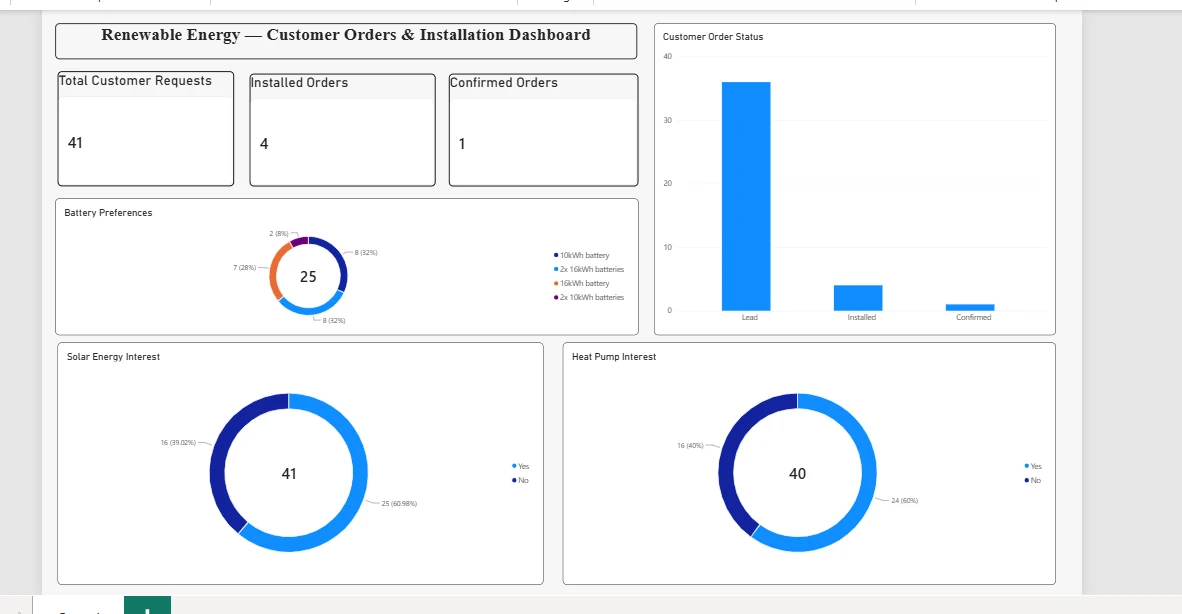
Interactive dashboards that summarise the figures you track most often.
Get a QuoteExcel data cleaning and analysis
Tidying, validating and analysing messy spreadsheets so their results can be trusted.
Get a QuoteSpreadsheet automation where applicable
Formulas and automation that reduce repetitive manual work.
Get a QuotePower BI dashboard development
Interactive Power BI reports that let your team explore performance for themselves.
Get a QuoteBusiness intelligence reporting
Regular, consistent reporting built around the measures that matter to you.
Get a QuoteData analytics with documented methodologies
Analysis with every step recorded, so results can be understood and repeated.
Get a QuoteBusiness and operational data insights
Practical findings from your operational data to support better decisions.
Get a QuoteFrom raw data to insight
- 01Raw dataInformation arrives scattered across files and systems.
- 02CleanedErrors, duplicates and gaps are found and resolved.
- 03StructuredData is organised around the questions that matter.
- 04InsightClear visuals show the pattern and what it means.
Not everything that can be counted counts, and not everything that counts can be counted.
What to expect
- Workbooks, dashboards or reports in Excel or Power BI
- Notes on data sources, assumptions and methods
- A walkthrough so your team can use what we build
- Visuals designed for the people who will read them
01
Understand
We learn your questions, your data sources and who will use the results.
02
Prepare
We clean, validate and structure the data so it can be relied upon.
03
Build
We create the workbook, dashboard or analysis around your key measures.
04
Explain
We document the method and walk you through the results.
Who you will work with

Muhammad Qutab
Manager & AI Team Lead
BS Artificial Intelligence · University of Kotli AJ&K
Tools we use
Microsoft Excel
Workbooks, dashboards, data cleaning and analysis.
Microsoft Power BI
Interactive dashboards and business intelligence reporting.
Python
Data analysis, machine learning and automation.
Google Colab
Cloud notebooks for analysis and model experiments.
Anaconda
Managing Python environments and data-science packages.
Google Forms
Surveys and straightforward data collection.
Microsoft Forms
Questionnaires, surveys and feedback collection.
Microsoft Power Apps
Simple low-code apps for business processes.
Microsoft Power Automate
Automating routine workflows between applications.
Questions
Which data tools do you use?
Mainly Microsoft Excel and Power BI, with Python and Google Colab for analysis where it helps.
See all toolsWill I understand how the analysis was done?
Yes. We document data sources, assumptions and methods, and walk you through the results so your team can use what we build.
Working across divisions
Tell us what you need and we'll reply with a clear plan and next steps.
Or email shopsharksolution@gmail.com